
How to play / Keyboard and controller
Controls
There is no attack button. You move, your weapons fire, and every few seconds you make a choice. The whole control scheme fits on this page.
01
Moving
Moving is aiming. It is also dodging, collecting and escaping. It is most of the game.
Keyboard
Use WASD or arrow keys to move.
Controller
Use the left stick to move. The D-pad works too.
Touch
Drag the movement pad to move. Touch applies where the game runs on a touch screen.
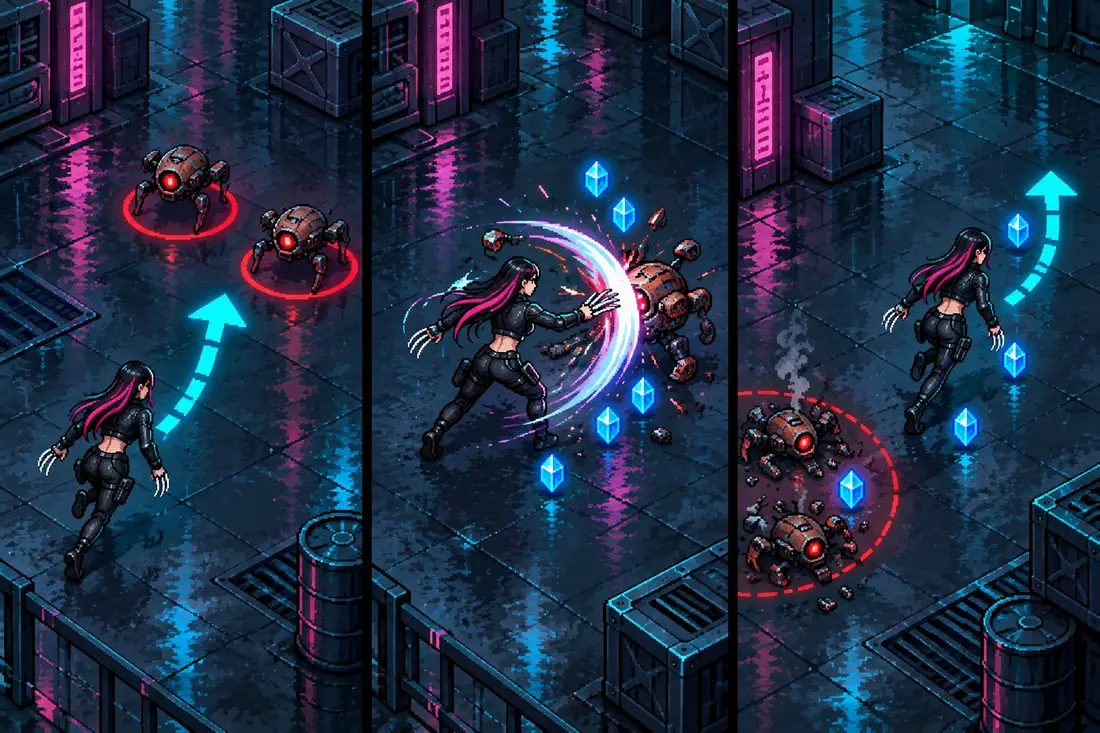
- 01Move toward the enemies.
- 02Your character attacks automatically.
- 03Collect blue crystals for experience points (XP).
Move along the road. Weapons attack automatically.
You can keep moving while you attack. Some Survivors want you close, some want you far, and one wants you to stand still. That is the whole difference between them, and it is a big one. See how each one plays.
02
Keyboard
Menus take the mouse as well. These are the keys worth knowing.
| Key | What it does |
|---|---|
| WASDor↑←↓→ | Move in the field. Move the selection in menus. |
| EscorP | Pause and resume. Esc also closes whatever is open. |
| M | Open the run map. The game pauses while you read it. |
| Enter | Confirm the selected choice. |
| F8 | Send feedback to the developers. The game freezes first. |
03
Controller
The game is playable start to finish on a controller, menus included. Steam lists it with Partial Controller Support.
| Control | What it does |
|---|---|
| Left stickorD-pad | Move in the field. Select or scroll in menus. |
| A | Confirm the named action. |
| B | Go back, close details, or resume. |
| XY | Actions for the current screen. The screen shows what each does. |
| LBRB | Change Survivor, category, pause page or loot page, as shown. |
| Menu | Pause and resume. It opens the run map. |
| View | Send feedback to the developers. |
04
On the level-up screen
The game pauses and shows four offers. There is no timer and no key that skips the choice.
| Action | Keyboard | Controller |
|---|---|---|
| Take an offer | 1234orEnter | A |
| Read the details of an offer | Y | Y |
| Look at your build | C | LB |
| Reroll the offers | R | RB |
| Banish the selected offer | X | X |
| Close details | Esc | B |
Reading the details does not spend the upgrade. Rerolls come from a Clinic upgrade. How to choose well is its own guide.
05
Reading the screen
Five things on screen answer almost every question you will have mid-run.


Find a shard. Get out.
Build something outrageous, fight your way up the Trail, and bring your haul home. Available now on Steam.